Sembli
An AI-native product, designed and built end to end
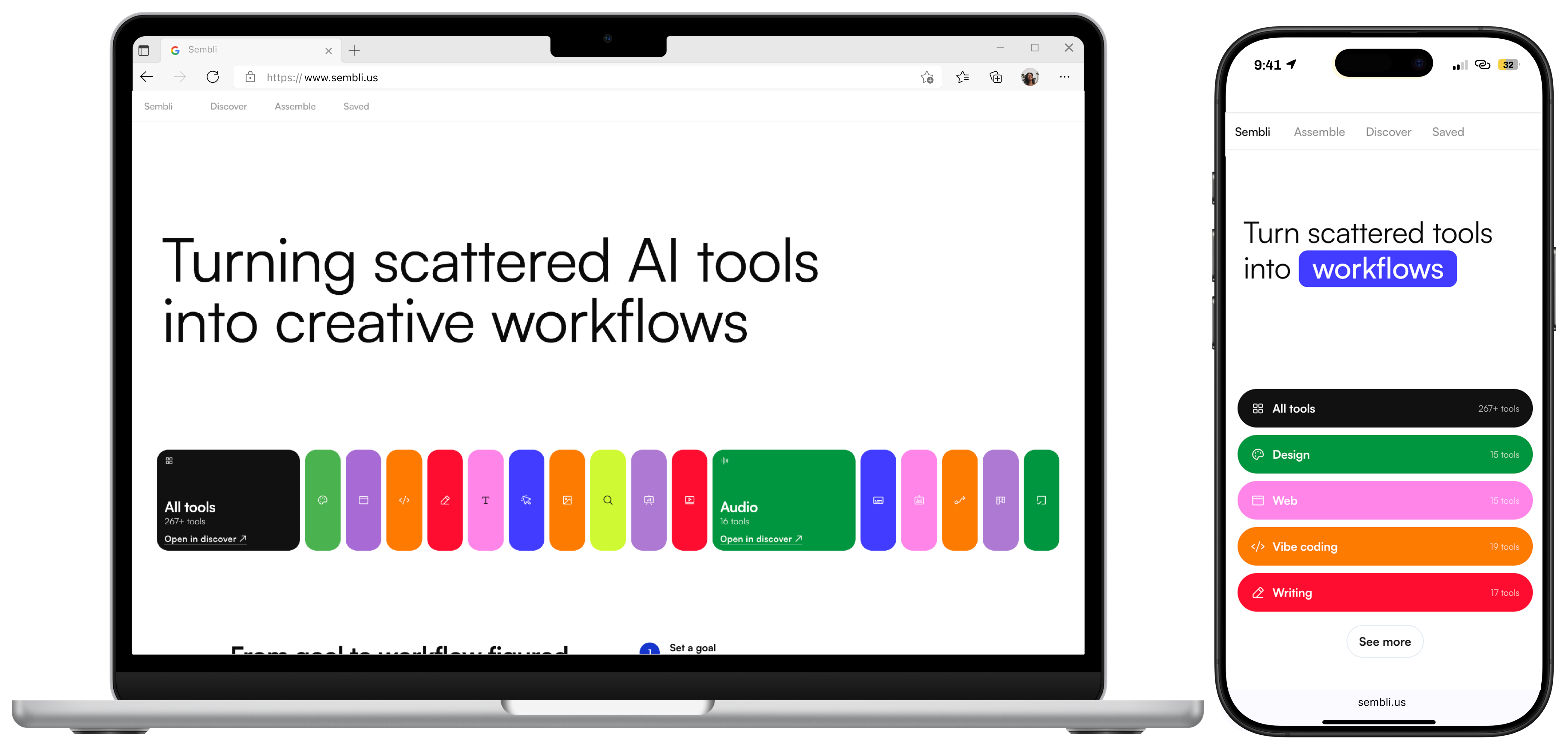
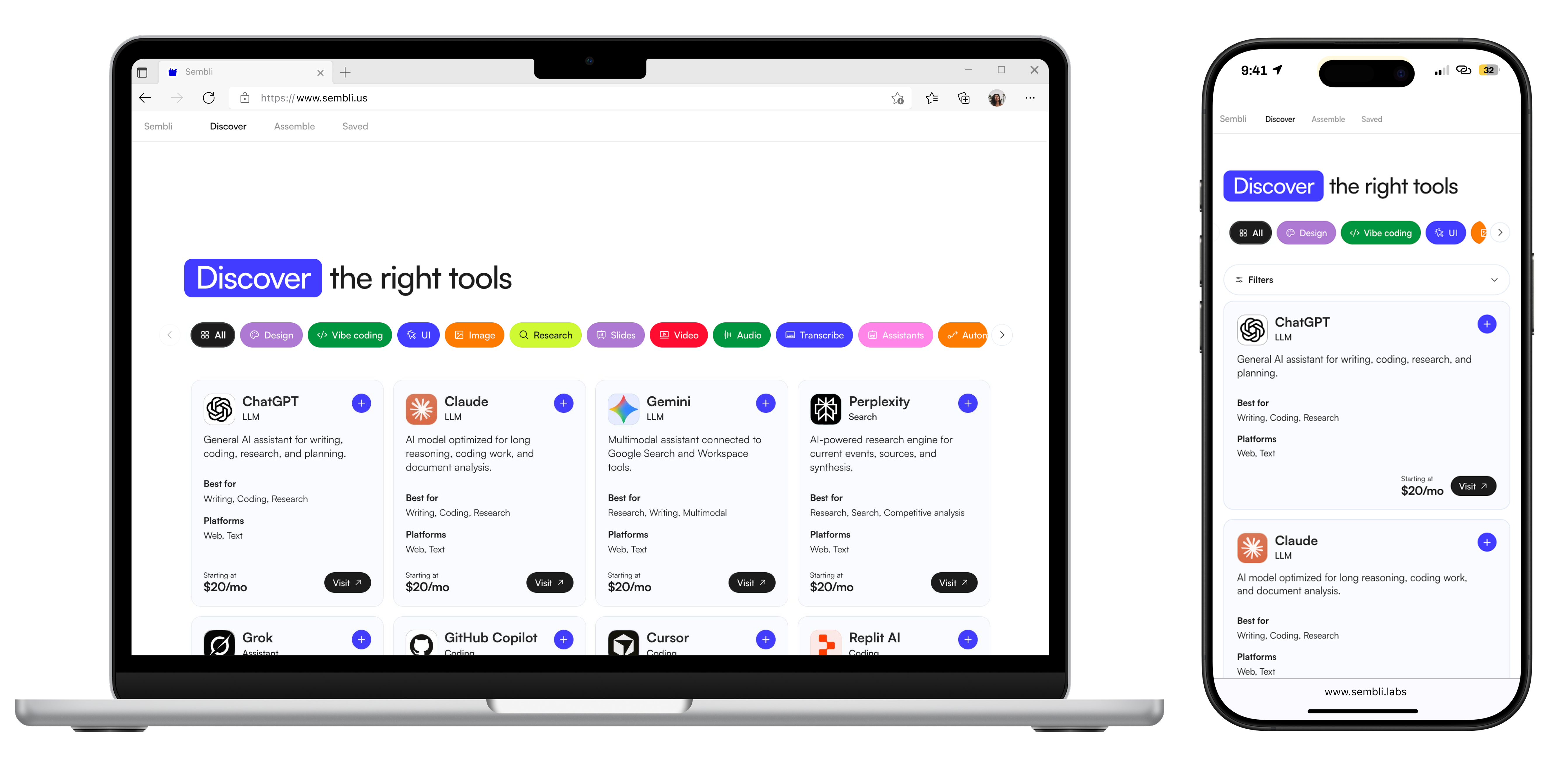
Sembli turns scattered AI tools into reusable workflows. You set a goal, compare the tools that get you there, and save the result as a workflow you can return to and share. It also helps you discover new tools, compare pricing, and start from prebuilt assemblies instead of a blank page.
I owned all of it: product strategy, UX/UI, the visual identity, and the working build. That includes the OpenAI and Gemini APIs wired in underneath. It began as my capstone. It's the project where I owned the whole stack, not just the screens.
The problem was never a lack of tools
The number of AI tools keeps growing, but using them across a single piece of work stays fragmented. Every tool is its own tab, subscription, and prompt. Deciding what to use, when, and how to combine it is left entirely to the user. They have to research the product, compare the pricing, guess at what pairs with what, and rebuild the process from scratch each time.
It lands hardest on designers and students, freelancers and creators, early-stage founders, and non-technical people. They want to build with AI without becoming full-time tool researchers to do it.
Starting wideSembli began as open-ended exploration around AI, creativity, and where product experiences are heading. I mapped a wide range of directions. One pattern kept resurfacing on my ideation boards: people were surrounded by tools but had no system for deciding what to use, when, and how to combine them. That observation became the project.
Writing the PRDTo pressure-test the idea, I wrote a product requirements doc covering the problem, audience, and core experience. It forced a fuzzy concept into three clear priorities: assemble, compare, and save workflows.
From "which tool?" to "what process am I building?"
The reframe is the whole product. Instead of optimizing "What tool should I use?", Sembli helps you answer "What process am I trying to build?" From there it works as a lightweight workflow builder: start from a goal, get a suggested stack or browse a prebuilt assembly, compare on price and fit, and save the workflow to reuse.
Designing the core flow, and building the AI under itThe heart is the prompt-to-stack flow: describe what you're making, set preferences like budget, and get back a workflow organized by task stage, such as research, copy, editing, and distribution. I built that generation with the OpenAI and Gemini APIs wired directly into the product, so the stack is assembled for you, not just browsed. I didn't only design this part. I developed it.
Choosing the structureI prototyped several directions before committing: tool marketplaces, workflow cards, standalone stack builders, saved libraries, and isolated pricing tools. Each did one thing well and broke on the rest. A marketplace helped you find tools but left you to assemble them. A builder assumed you already knew what you wanted. The version that worked combined both, pairing the discoverability of a directory with the guidance of a workflow builder.
Organizing the systemI structured Sembli into four areas: Home, Discover, Assemblies, and Saved. Together they hold the full arc: find a tool, build a repeatable system, and return to a saved workflow when the task comes back.
The Stack Builder is the product idea, made usable
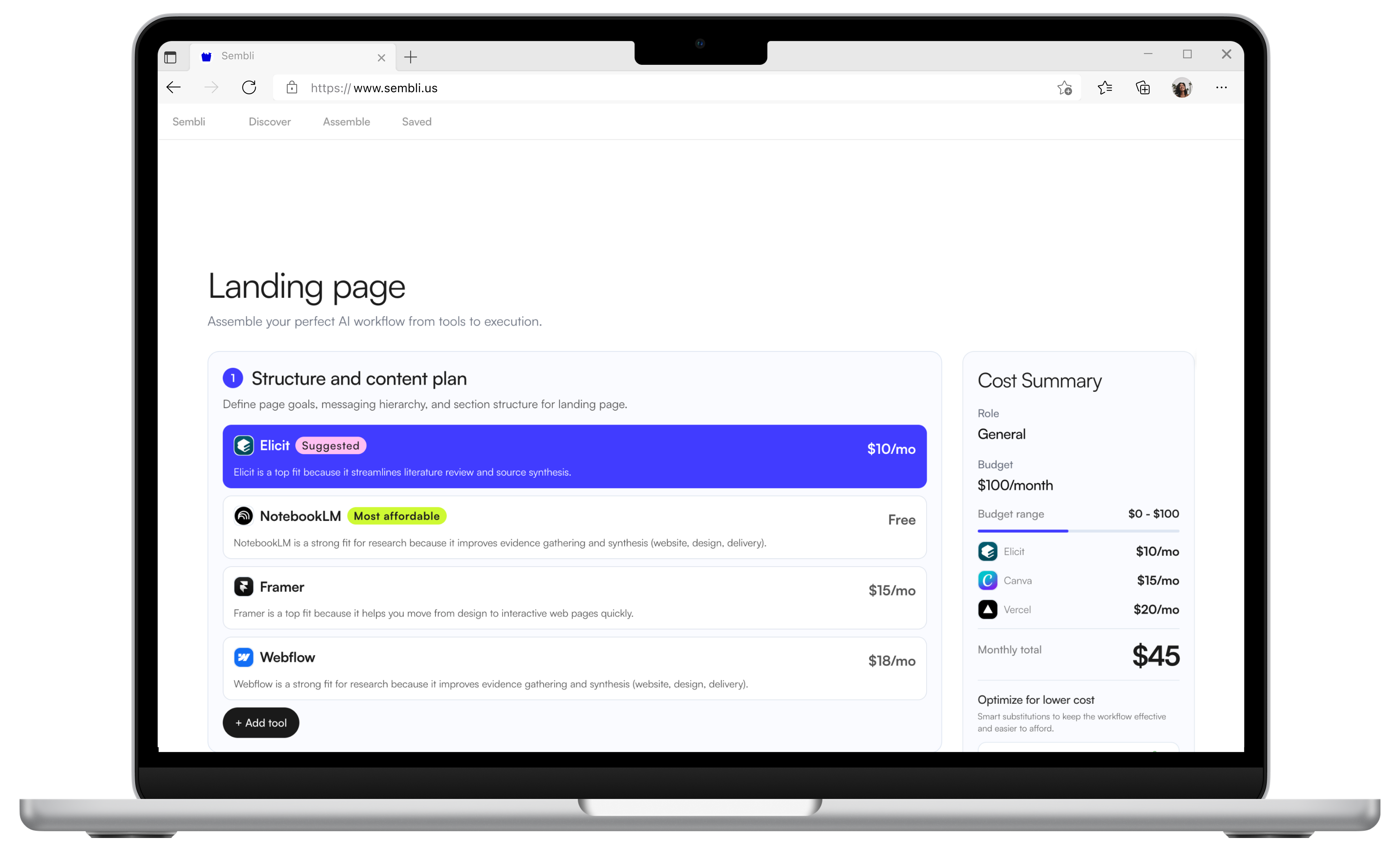
The Stack Builder is the clearest expression of the concept. Tools are grouped into workflow stages, and you can compare, swap, and reshape any part of the stack. It's the moment a pile of tools becomes a process you can run again.
Making budget visibleCost drives most real tool decisions, but it's usually buried across separate pricing pages and subscriptions. I pulled budget into the workflow itself, through pricing filters, a running cost summary, and side-by-side comparisons. You choose on function and spend at the same time, before committing to anything.
Brand identity
The identity grew straight from the product idea of assembling scattered pieces into something useful. A playful mascot, bright accent graphics, and a name that suggests combining and building give Sembli personality without burying the clarity of the system underneath.
Discovery and a workflow builder, in one product
The final experience combines goal-led discovery, tool exploration, prebuilt assemblies, the Stack Builder, and saved workflows. It treats AI tools as parts of a larger process, not a list to pick from.
Constraints and decisionsThe constant tension was guidance versus freedom. Too much structure and it becomes a rigid template. Too little and it's just another directory. So I put the intelligence into the assembly itself: a goal goes in, an organized stack comes out, and everything stays swappable. Building that generation on the OpenAI and Gemini APIs is what made the guidance real, not just a static list.
A shipped product, with the AI built in
Sembli is live at sembli.us. It catalogs 250 AI tools. It ships 70 prebuilt, vetted workflows, so no one starts from a blank page. And it runs goal-to-stack generation through the OpenAI and Gemini APIs. It's a working product, not a prototype. It's also the project where I designed and built the whole thing myself.
Takeaways
Owning the whole stack
Sembli is the project where I went past the screens, into strategy, brand, and the build, including the AI integration. Wiring real LLM APIs into my own product changed how I design AI features. Now I know what's cheap, hard, or possible underneath the interface.
Structure over tools
The product was never the catalog. It's the system that turns a catalog into a process. The strongest direction only appeared once I stopped trying to pick a single pattern and combined discovery with guided assembly.
Designing for approachable complexity
The real work was making something complex feel light: a playful brand, clear interfaces, and budget made visible. The system reduces overwhelm instead of adding to it. That balance is what I'm proudest of here.